
Fanvue Review: Features, Fees, and Who It Is For
Turning your followers into paying fans sounds great in theory, and that’s what subscription platforms promise: more control over how you monetize your content. But what you actually earn depends on more than your subscription price. You still need to attract subscribers, keep them around, and make sure platform fees don’t eat too big a bite out of your earnings.
So, today, we’re putting Fanvue under the microscope to answer one question: do its features stack up against what you’ll pay and the work you’ll put in?
We’ll explore what the platform offers, break down its fees and payout process, and weigh its pros and cons to help you decide whether it’s worth adding to your creator toolkit.
⚠️ A note before we begin: this review is based on available platform information, not hands-on testing.
Fanvue at a Glance
Fanvue brings subscriptions, paid content, messaging, AI tools, and analytics under one roof, giving you plenty of ways to run and grow your creator business. But how much you get out of those tools depends on how much time you can put into creating content, connecting with fans, and bringing people to your page.
Pros:
- Lets you set your own subscription price within its available range
- Offers multiple revenue streams beyond subscriptions
- Keeps a standard 20% platform fee, with 80% going to the creator
- Provides AI-powered tools to reduce time spent on messaging and fan interaction
- Includes messaging features that let you engage directly with subscribers and build loyalty
Cons:
- Relies heavily on self-promotion, so you’ll need to attract most of your audience through external channels
- Doesn’t guarantee subscribers, sales, or meaningful income just because you have an account
- Places earnings in a pending period and requires you to meet withdrawal requirements before you can access your money
- May create a gap between AI-powered interactions and fans’ expectations of personal communication
What Is Fanvue?
Fanvue is a creator monetization platform designed around loyalty, connection, and long-term earning. It helps you turn your content into income by building a community of paying fans, rather than relying entirely on brand deals, ad revenue, or social media monetization programs.
Fanvue is home to creators in all kinds of mainstream and modern niches, from fitness and fashion to music and entertainment, so you have full creative freedom to make the platform your own and offer your fans more of the content they love.
How Fanvue works
Your Fanvue creator profile gives you a space to share content with your fans and decide how they can access it.
You can let fans follow you for free to access your public content, offer exclusive content through a monthly subscription (priced between $3.99 and $100), sell content individually, or receive tips from fans. You’re not locked into a single way of earning, so you can change your setup as you get to know your audience.
Fanvue also gives you different ways to connect with your audience, from direct messages to AI features. Subscribers can message you by default, and you can open up messaging to followers, too, with the option to ask for a tip or gift first. These features give you more opportunities to get to know your audience and build closer connections with them beyond your content.
Fanvue Features: What Can You Actually Do?
Fanvue’s feature set covers different parts of running a creator business. Here’s what you get:
Monetization tools: Sell content beyond subscriptions
Your Fanvue page can bring in income in more than one way, including:
- Subscriptions: Give paying fans ongoing access to exclusive content for a monthly fee.
- Paywalled posts: Put individual content pieces (e.g., a photo set, detailed tutorial, or video) behind a paywall for $3 to $500.
- Pay-to-view messages: Send photos or videos directly to fans through DMs, with each message priced at $3 to $500 to unlock.
- Tips: Let fans send you a little extra when they want to show their support.
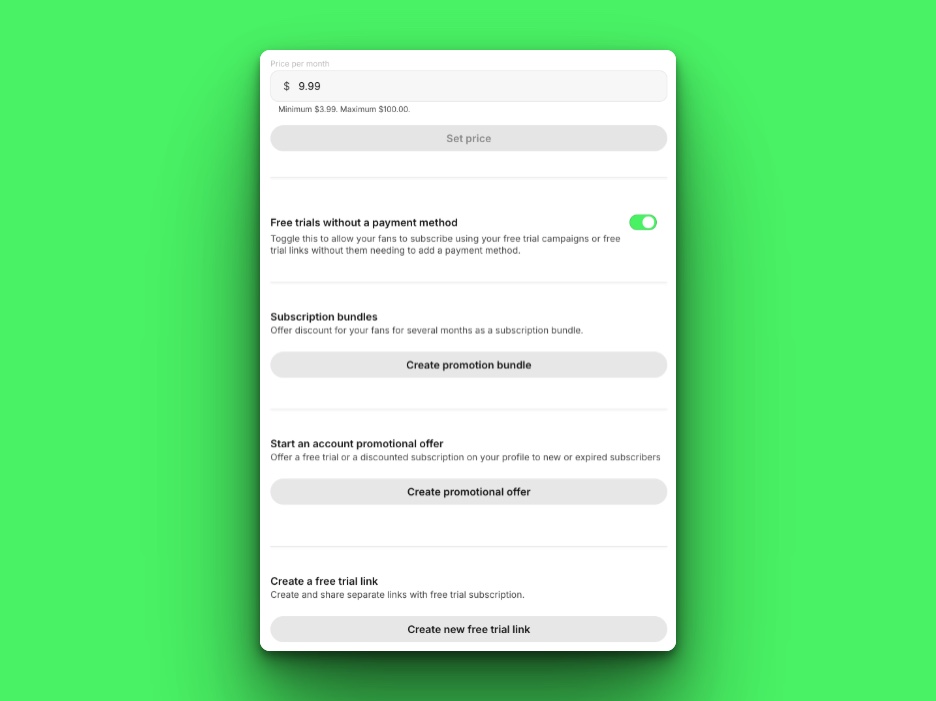
You can mix these options to suit your content. For example, if you’re a fitness creator, you could offer an exclusive workout library to subscribers and sell personalised video form reviews separately. Or if you’re a musician, you could share subscriber-only updates about upcoming releases and sell behind-the-scenes studio footage through pay-to-view messages.
The catch is that every offer needs to give fans a reason to pay. You’ll need to think carefully about what to include in a subscription, what to sell separately, and how much content you can realistically keep up with.
Messaging and fan engagement tools: Build relationships with paying fans
Fanvue’s DMs let you get to know your fans, answer their questions, and keep conversations going. You can also use automated messages triggered by actions like a new follow, subscription, purchase, or cancellation.

Let’s say you’re a beauty creator. You could welcome new subscribers with an automated message pointing them to your most popular makeup tutorial. Similarly, if you’re a travel creator, you could thank fans for buying a travel guide and let them know what else is available on your page.

Of course, you’ll need to set these messages up and revisit them as your content and offers change. If they don’t fit the situation, they can feel impersonal. And while automated messages can handle some repetitive interactions, keeping up with personal DMs can still take time, especially as your audience grows.
AI tools: Connect with fans in new ways
Fanvue offers AI tools that can help you manage fan conversations and give new ways for your fans to interact with you:
- AI messages: Help you manage written conversations by drafting or refining replies and summarizing chats so you can quickly catch up. This feature is only available if you select NSFW at signup.
- AI voice notes and calls: Let you turn text into audio using an AI-generated clone of your voice, or let fans have calls with that clone or a custom AI Self when you’re unavailable. Voice call access may vary, though.
- AI avatars: Help you create visual content featuring an AI-generated version of your persona, so you can make more content without appearing in every piece.
To help you picture this, if you’re an athlete with a busy schedule, for example, you could clone your voice or design one by describing its tone and accent, then set your AI Self’s core personality traits. You could then use this setup to offer AI voice calls with your AI Self even when you’re tied up.

The main consideration here is how your fans feel about AI. Fanvue requires you to disclose AI-generated content, and some fans may prefer content and conversations that come directly from a person. You’ll also need to review what AI produces and decide how comfortable you are with it representing you.
Analytics: Understand what drives results
Fanvue’s built-in Insights shows you where your subscribers are coming from and which paid offers are bringing in the most revenue. There are 2 parts to this:
- Creator analytics: Give you earnings and performance data to help you understand what’s contributing to your income. For instance, you might find that one content type earns more than another, giving you a better sense of what your audience is willing to pay for.
- Tracking links: Help you measure the results of your promotions across different channels. For example, you can create separate tracking links for Instagram, TikTok, or your newsletter to see which brings in the most people to your Fanvue page, then focus your attention accordingly.

The numbers only tell you so much, though. Tracking links can show where traffic comes from, but they won’t tell you why someone subscribes and later leaves, for example. You’ll still need to look at your offers and audience feedback. And if your page is still new, you may not have enough data yet to spot meaningful patterns.
App Store: Work smarter across your creator business
As your creator business grows, you may want extra tools to help with tasks like creating content, scheduling posts, or engaging with fans. Fanvue’s App Store brings together apps designed for these needs, so you can spend less time juggling different tools and keep more of your creator business running in one place. Here’s a glimpse of some tools:
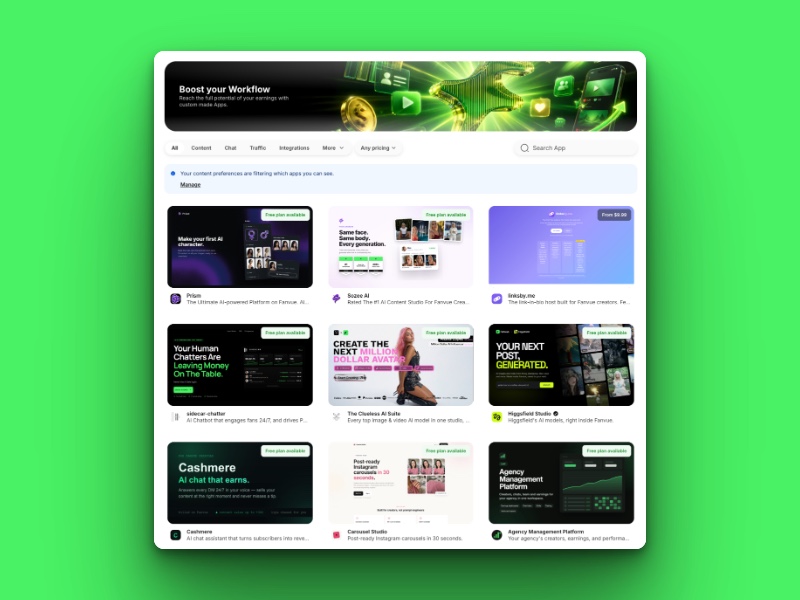
- Prism (third-party app): Generates AI images and videos featuring your creator persona, without requiring advanced prompting skills. You can start with its free plan or choose from 3 paid plans.
- FameDeck (Fanvue tool): Brings post scheduling, SFS collaborations, and mass DMs into one toolkit. It’s free for Fanvue creators.
- Creator Class (third-party app): Turns your paid content into courses, with lesson management and student progress tracking built in. You can build and test courses for free, but publishing them and giving students access requires a premium subscription.
- Discord (third-party app): Gives you a dedicated space to bring fans together and keep conversations going. You can create and manage a community for free as a Fanvue creator.
One consideration to note is that the App Store includes both Fanvue tools and third-party apps, and not every app is included with your account. Some offer free access or trials, while others charge separately. You’ll need to check each listing to see what you can access and whether it’s worth the extra cost for your needs.
Fanvue Fees and Payouts Explained
Fanvue’s standard revenue split is straightforward, but payout timing, withdrawal fees, and regional requirements can affect how much you receive and when.
Platform fees and additional costs
Fanvue’s standard revenue split gives you 80% of your earnings, while the platform takes 20%. Temporary promotional rates may offer a higher share, but these depend on the promotion’s eligibility requirements and duration.
For example, if you generate $100 in qualifying sales, that leaves you with $80 after Fanvue’s standard 20% platform fee, before any other applicable costs, such as:
- Payout fees: Fanvue’s payout fees depend on the withdrawal provider. For example, TripleA charges a 1% fee, deducted from your withdrawal amount. You’ll see any applicable fee and your net payout before confirming your withdrawal.
- App Store fees: Some apps charge separately, which can reduce your overall earnings.
- Chargebacks: If a fan disputes a payment through their bank, the disputed amount may be deducted from your earnings. A high dispute rate can also lead to payout restrictions or additional fees.
- Taxes: You’re responsible for paying any taxes due on your creator income. Fanvue says it doesn’t withhold taxes on your behalf.
Getting paid
Your earnings don’t become available to withdraw immediately after a sale. Here’s how Fanvue’s payouts work:
- Pending period: Earnings typically remain pending for 7 days, but this can extend to 28 days in certain circumstances. Payments from fans who haven’t verified their email may be held for up to 30 days.
- Minimum balance: You generally need at least $20 in Available Balance to request a payout, though the threshold may be higher in some regions.
- Account requirements: You must have at least 5 pieces of content uploaded, and any co-creators featured in your content must be verified.
- Processing times: Payouts typically take 3-5 business days, depending on the method. Fanvue’s policy allows up to 10 business days to initiate valid requests, and first-time withdrawals may take longer due to security checks.
- Regional differences: Available payout methods vary by location.
Whether these costs make sense depends on what you need from the platform and how much work you’re prepared to put in. We’ll weigh that up next, looking at who Fanvue is best suited for, what it takes to get your account up and running, and what to consider before making your final decision.
Who Is Fanvue Best For?
Fanvue makes the most sense for creators who want more control over how they earn from their content and connect with their audience. It may be a good fit if you’re:
- Just starting out: You want to build a loyal community through exclusive content and personal interactions, turning followers into paying fans over time.
- Growing your audience: You’re ready to start earning from your content by developing a paid offering and testing what your fans are willing to pay for.
- Already established: Your audience is growing, but so is the workload. You want more ways to earn without spending all your time creating content and answering messages.
- Building an AI or virtual persona: You want to turn your digital character’s content and personality into an interactive experience fans can subscribe to.
Fanvue may be less suitable if your main goal is growing your following rather than monetizing it. In that case, a platform with stronger discovery features may be a better option. Similarly, if you’d rather sell products or content without regularly interacting with subscribers, a storefront or on-demand sales platform may suit your workflow better.
How to Get Started With Fanvue
Here’s how to create a Fanvue account and prepare for launch:
Set up your account and page
- Create an account: Head to the Fanvue website and click Sign Up in the top-right corner. Register with the email address and password you want to use.
- Switch to a creator account: Once you’ve created your fan account, click Become a Creator and follow the prompts to complete your account details.
- Verify your identity: Submit a valid ID and a high-quality selfie to complete Fanvue’s verification process. You’ll need to do so to earn money, even if you plan to use a stage name and keep your face off your public profile.
- Complete your profile: Add a profile picture, banner, bio, and intro video. Then, set your subscription price and configure your payout method.
You must be at least 18 years old to create a Fanvue account. See the platform’s Terms & Conditions for more about its eligibility requirements.
Plan your launch
A little preparation before launching your profile can help attract subscribers and give them reasons to stick around:
- Build a strong profile feed: Fanvue recommends uploading at least 10 pieces of content before promoting your page. Plan a mix of introductory posts, behind-the-scenes content, and exclusive photos or videos so new visitors have a reason to subscribe.
- Optimize your pricing: Consider the amount and type of content you’ll offer, and compare your subscription price with similar creators in your niche. You can adjust your pricing later as you learn what your audience is willing to pay.
- Prepare your social promotion: Plan teasers for your exclusive Fanvue content alongside your usual posts, and add your Fanvue link to your social profiles. Give followers a preview of what’s behind the paywall and a clear reason to check out your page.
So, Does Fanvue Deliver?
When you weigh the fees against what you get, Fanvue makes a pretty strong case for itself. It takes a 20% cut under its standard revenue split, but in return, you get several ways to earn from your content, plus AI tools that help you offer fans a more interactive experience without having to do it all yourself.
The bigger consideration is how much work you’re willing to put in. If you’re expecting passive income without putting in the work, Fanvue isn’t for you. It won’t bring paying fans to your page for you—you’ll need to drive traffic from your social channels, create content regularly, and keep conversations going. That takes real time and effort, but there’s no shortcut around it if you want to turn content creation into a business.